If you’ve ever been curious about Internet Relay Chat (IRC), you might think it’s difficult to get started. Years ago, joining an IRC network often meant downloading a desktop client, configuring server settings, and learning a long list of commands before you could even say hello.
Not anymore.
Morphie brings the classic IRC experience into the modern web, making it easier than ever to connect with real people. Whether you’re discovering IRC for the first time or returning after years away, you can be chatting on the Morphie IRC Network in about 10 seconds.
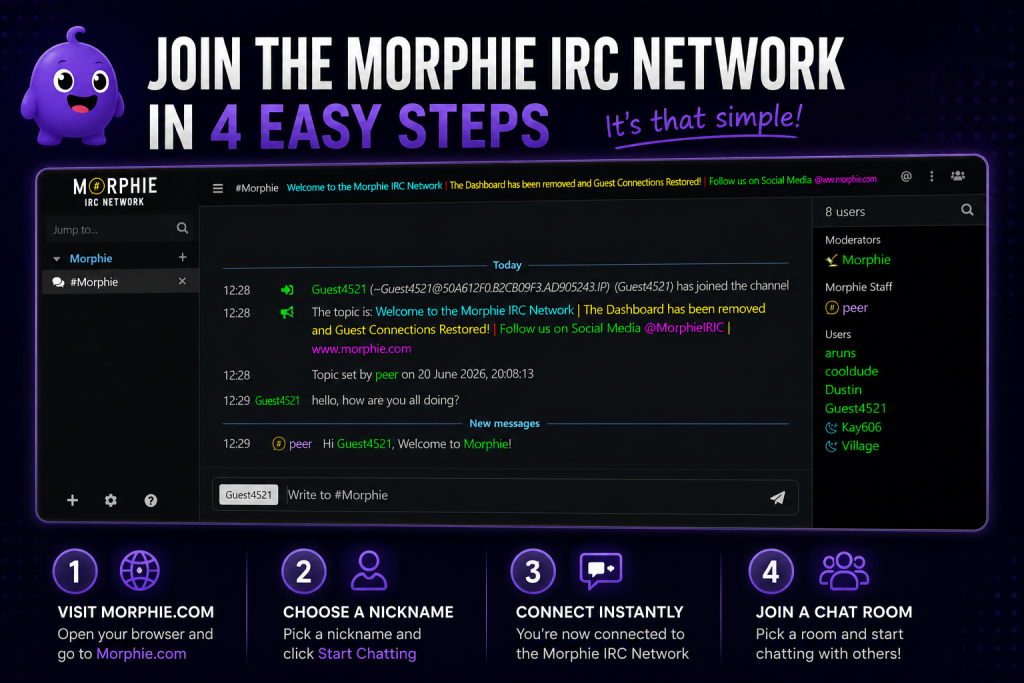
Step 1: Visit Morphie.com
The first step couldn’t be easier.
Open your favorite web browser and head to Morphie.com.
There’s nothing to install and nothing to download. The web chat client loads directly in your browser, so you’re ready to connect almost instantly.
Whether you’re using Windows, macOS, Linux, Android, or an iPhone, Morphie works wherever your browser works.
Step 2: Choose a Nickname
Before joining the network, simply enter the nickname you’d like to use.
That’s it.
You don’t need to create an account before chatting. Just pick a nickname and continue.
If you later decide you want to reserve your nickname or unlock additional features, you can register it—but registration is completely optional for getting started.
Step 3: Click “Start Chatting”

Once you’ve chosen a nickname, click Start Chatting.
Within seconds you’ll be connected to the Morphie IRC Network.
No complicated setup.
No server addresses to memorize.
No ports to configure.
No confusing menus.
Just click and chat.
Step 4: Join a Chat Room
After connecting, you can browse and join one of Morphie’s public chat rooms.
Whether you’re looking to meet new people, discuss your favorite hobbies, play community games, or simply enjoy casual conversation, there’s a room waiting for you.
Every chat room has its own community and personality, making it easy to find a place where you feel at home.
Why Morphie Makes IRC Easy

IRC has been bringing people together since 1988, but many networks still expect users to understand commands, install software, and configure connections before they can participate.
Morphie removes those barriers.
Instead of worrying about the technical side of IRC, you can focus on what IRC has always been about—meeting people and having conversations.
That’s why Morphie is built around a simple idea:
Choose a nickname. Join a room. Start chatting.
Want More Features?
While anyone can jump into the conversation in seconds, creating a free Morphie account unlocks additional community features.
Registered members can personalize their profile, reserve their nickname, receive memos, participate in community events, and take advantage of new features as they’re added.
You can start chatting first and decide later if you’d like to register—there’s no pressure.
More Than Just Chat
Morphie isn’t just another IRC server.
It’s a growing community where you can:
- Meet people from around the world.
- Join active public chat rooms.
- Play built-in IRC games like Trivia, UNO, and battle games.
- Earn trophies and community achievements.
- Participate in special events hosted throughout the year.
- Become part of a friendly community built around the spirit of classic IRC.
Whether you’re a longtime IRC veteran or someone who’s never connected to a chat room before, Morphie welcomes everyone.
Start Chatting Today
Connecting to IRC doesn’t have to be complicated.
With Morphie, you can go from opening your browser to chatting with real people in about 10 seconds.
No downloads.
No complicated setup.
No registration required.
Just choose your nickname, join a room, and experience why IRC continues to connect people around the world after more than three decades.
Classic Chat Rooms. Modern Community.